How to Get a New Insurance Card
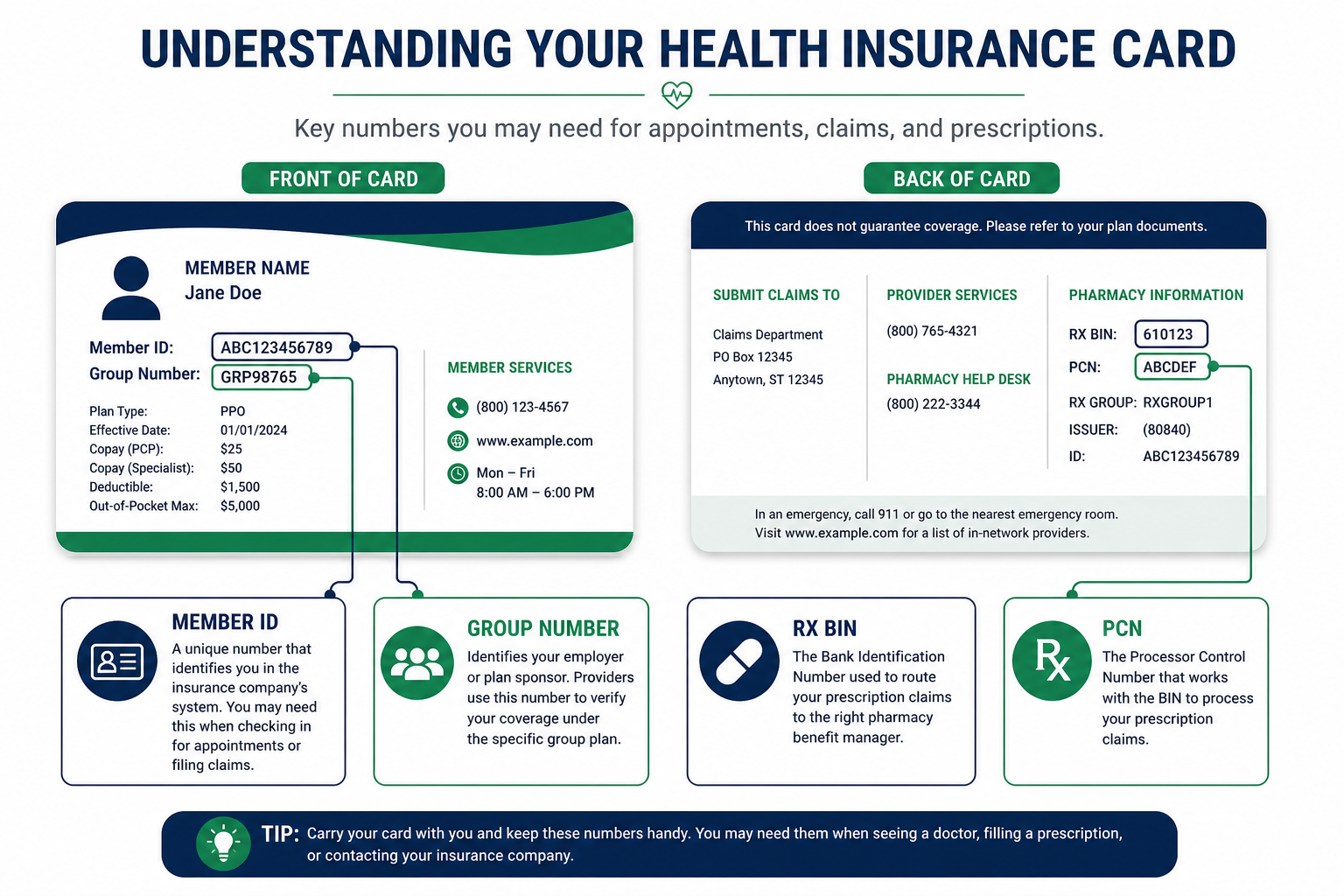
What to Do If You Lost Your Insurance Card
Key Takeaway: A lost card is not a lost coverage. Download a digital card immediately through your insurer's portal or app, then order a mailed replacement. Save your member ID, group number, and policy number in a secure location so you have them even without the physical card.
If you are searching how to get a new insurance card, you likely lost your card, had it stolen, or need a replacement after a plan change. Your coverage remains active — the card is proof of coverage, not the coverage itself. Most providers and pharmacies can verify eligibility with your member ID even before a replacement arrives.
Immediate steps when you lose your card:
- Log into your insurer's member portal or mobile app and download a digital card
- Check your last Explanation of Benefits (EOB) or billing statement for your member ID and group number
- Call member services to report the loss and request a mailed replacement
- If the card was stolen, ask whether you should monitor for fraudulent claims on your account
- Store your member ID and group number in a password manager for future reference
Digital cards are accepted at most pharmacies and provider offices. Show the card on your phone screen or provide your member ID verbally. If a provider insists on a physical card, ask them to verify eligibility electronically, most practice management systems can confirm coverage in real time.
Step-by-Step: How to Get a New Insurance Card
Key Takeaway: The replacement path depends on your coverage type, employer, marketplace, Medicare, or Medicaid each use different portals. Identify your plan type first, then follow the matching channel below.
- Identify your plan type. Employer-sponsored, marketplace (Healthcare.gov), Medicare, Medicaid, or individual off-exchange. The replacement process differs for each.
- Access your member portal. Log into your carrier's website or app. Navigate to “ID Cards,” “Member Materials,” or “Documents.” Download or print a temporary digital card immediately.
- Request a mailed replacement. Most portals have a “Order Replacement Card” button. Alternatively, call the member services number on your last EOB. Allow 7–14 business days for delivery.
- Update pharmacy records. If your card includes Rx BIN, PCN, and Group numbers for Express Scripts, OptumRx, or Caremark, provide updated numbers to your pharmacy before your next prescription fill.
- Verify card details. Confirm your member ID, group number, and plan name match what your employer or carrier shows in their system. Errors on replacement cards happen, catch them before your next appointment.
- Save digital copies. Screenshot or PDF your digital card and store it securely. You will need it again if the mailed card is also lost.
Wrong vs. Right Replacement Steps (Before & After)
Key Takeaway: Patients who call random numbers or pay third-party “card replacement services” risk scams. Replacement cards are always free through official insurer, Medicare, or marketplace portals.
| ❌ Wrong Approach | ✅ Right Approach |
|---|---|
| Pay a website $29.99 to “mail your new Medicare card fast.” | Order a free replacement at SSA.gov/myaccount or call 1-800-MEDICARE. Medicare never charges for card replacement. Delivery takes up to 30 days; use MyMedicare.gov for a temporary card meanwhile. |
| Wait two weeks for the mailed card before seeing a doctor or filling prescriptions. | Download a digital card from your carrier portal or Availity immediately. Provide member ID and group number to the pharmacy or provider office. Most accept digital cards or electronic eligibility verification same day. |
| Use your old plan's card after switching during open enrollment. | Download the new carrier's digital card as soon as enrollment confirms. Update pharmacy with new Rx BIN and PCN for Express Scripts, OptumRx, or Caremark. Verify new member ID on Availity or the carrier portal before your first appointment on the new plan. |
Denied Coverage After a Card Mix-Up?
Wrong member ID or outdated card details can trigger claim denials. AppealFlow drafts a formal appeal letter citing your denial reason and appeal rights, free in under 60 seconds.
Digital Insurance Cards: Instant Replacement
Key Takeaway: Digital cards through carrier portals and mobile apps are available immediately, no waiting for mail. Most major insurers, PBMs, and Availity offer downloadable ID cards accepted at pharmacies and provider offices.
The fastest way to get a new insurance card is to skip the mail entirely. Nearly every major carrier now provides digital ID cards through member portals and mobile apps. Log in, navigate to ID Cards or Member Materials, and download or screenshot the card.
Where to get digital cards by platform:
- Carrier member portals: BCBS, Aetna, UnitedHealthcare, Cigna, Humana, all offer digital cards in their apps
- Availity: Some plans display ID cards through the Availity member portal for BCBS and regional plans
- PBM portals: Express Scripts, OptumRx, and Caremark show pharmacy benefit cards with Rx BIN, PCN, and Group numbers separate from your medical card
- Employer benefits portals: Workday, Benefitfocus, and similar HR systems often host digital cards for employer-sponsored plans
To understand what each number on your card means, member ID, group number, Rx BIN, PCN, see our guide on how to read a health insurance card. Knowing these fields helps you provide correct information even without the physical card.
Getting a New Medicare Card (SSA.gov and Medicare.gov)
Key Takeaway: Medicare card replacement is free through SSA.gov or 1-800-MEDICARE. Allow up to 30 days for mail delivery. Print a temporary card from MyMedicare.gov while you wait. Report stolen cards to SSA.gov to protect against identity theft.
Medicare beneficiaries order replacement cards differently from commercial plan members. Your red, white, and blue Medicare card is issued by the Social Security Administration, not your Medicare Advantage or Part D plan.
How to get a new Medicare card:
- SSA.gov: Log into myaccount at SSA.gov and request a replacement Medicare card online. Free, no fee. Delivery within 30 days.
- 1-800-MEDICARE: Call 1-800-633-4227 and request a replacement card by phone.
- Medicare.gov / MyMedicare.gov: Print a temporary card or view your Medicare number while waiting for the mailed replacement. Your Medicare Summary Notice also shows your Medicare number.
- Local Social Security office: Visit in person if you cannot access online services.
If you have Medicare Advantage or a Part D plan, you also receive a separate plan card from your insurer. Order that replacement through your plan's member portal or customer service, not SSA.gov. You need both cards: the Original Medicare card for Part A/B identification and the plan card for Advantage or Part D benefits.
Scam alert: Medicare will never call unsolicited asking for your Medicare number or payment for a new card. If someone contacts you claiming to be Medicare and requesting payment, it is a scam. Request replacements only through SSA.gov, Medicare.gov, or 1-800-MEDICARE.
Marketplace Plans: Healthcare.gov and Carrier Portals
Key Takeaway: After enrolling on Healthcare.gov, your selected carrier mails a physical card within 7–14 business days. Download a digital card from the carrier portal as soon as enrollment is confirmed, do not wait for mail.
Marketplace enrollees who purchased coverage through Healthcare.gov receive ID cards from their selected insurance company, not from Healthcare.gov directly. After your enrollment is confirmed, log into your carrier's member portal (Ambetter, Oscar, Molina, BCBS, etc.) to download a digital card immediately.
Steps for marketplace card replacement:
- Log into Healthcare.gov and confirm your current plan and carrier name
- Go to your carrier's member portal (link is usually on Healthcare.gov enrollment confirmation)
- Download digital ID card from Member Materials or ID Cards section
- Order mailed replacement through the portal or call carrier member services
- If you changed plans during open enrollment, use only the new plan's card after the effective date
If you are mid-year and lost your card, the carrier portal is your fastest path. Healthcare.gov itself does not issue ID cards, it is the enrollment platform. All card replacement requests go through your insurance company.
Employer Plans: HR and Benefits Portals
Key Takeaway: Employer-sponsored plan members should contact HR or log into the company benefits portal (Workday, Benefitfocus, Employee Navigator) for digital cards. HR can also confirm your member ID if you have no EOB on hand.
If your health insurance comes through your employer, you have two paths for a replacement card: your company's HR or benefits department, and your insurance carrier's member portal.
Start with your employer benefits portal, many companies host digital ID cards through Workday, Benefitfocus, or similar systems. If your employer does not provide portal access, contact HR directly. They can confirm your member ID, group number, and carrier contact information even if you have no physical card or EOB.
You can also log into your carrier's member portal directly using credentials you set up during enrollment. Employer plan cards show your group number (employer's identifier) prominently, providers need this along with your member ID for claims. If HR gives you updated group information after a plan change, update your pharmacy and primary care provider before your next visit.
PBM Cards: Express Scripts, OptumRx, and Caremark
Key Takeaway: Your medical insurance card and pharmacy benefit card are often different documents. PBMs issue separate cards with Rx BIN, PCN, and Group numbers. Order PBM card replacements through the PBM portal, not your medical insurer's site.
Many patients discover they have two cards: a medical insurance card from their health plan and a pharmacy benefit card from their PBM. The back of your medical card may list PBM contact information, but the Rx BIN, PCN, and Group numbers needed at the pharmacy often appear on a separate PBM card or in the PBM member portal.
| PBM Portal | How to Get Digital PBM Card |
|---|---|
| Express Scripts | express-scripts.com → Member Login → ID Card → View/Print |
| OptumRx | optumrx.com → Member Login → My Pharmacy Benefits → ID Card |
| Caremark (CVS) | caremark.com → Member Login → Coverage & Claims → ID Card |
When you get a new insurance card after a plan change, update your pharmacy with new Rx BIN and PCN numbers before your next fill. Using outdated PBM information causes claim rejections at the pharmacy counter, a problem that digital card downloads prevent when you update records immediately after receiving new card details.
Five Mistakes When Replacing Your Insurance Card
Key Takeaway: Waiting for mail when a digital card is available, using an old plan's card after switching, and falling for Medicare replacement scams are the most common, and costly, replacement mistakes.
- Waiting for mail instead of downloading a digital card. Most carriers offer instant digital cards. Do not delay care or prescriptions while waiting 7–14 days for mail.
- Using an old plan's card after open enrollment. Old member IDs cause claim denials. Download the new carrier's digital card on the plan effective date.
- Paying for Medicare card replacement. SSA.gov and Medicare.gov never charge for replacement cards. Any site requesting payment is a scam.
- Forgetting to update pharmacy PBM information. New Rx BIN and PCN numbers must reach your pharmacy before the next prescription fill, update through the pharmacy app or at the counter.
- Not saving member ID separately. Store your member ID, group number, and policy number in a password manager. If you lose the card again, you have the numbers without calling member services.
Frequently Asked Questions
Answers to the most common questions about how to get a new health insurance card.
Denied Because of Card or ID Issues?
Wrong member ID or outdated plan information can trigger denials. AppealFlow.net drafts a formal appeal letter citing your denial reason and federal appeal rights, edit live, download as PDF or Word. No account required.
- 100% Free
- No Signup
- PDF & Word Export
Disclaimer: This article is for educational purposes only and does not constitute medical or legal advice. AppealFlow.net is not a healthcare provider or law firm. Success rates cited are estimates based on industry advocacy data and vary by plan. Always review appeal letters with your prescriber before submission. For medical emergencies, call 911. See our full disclaimer.