How to Read a Health Insurance Card
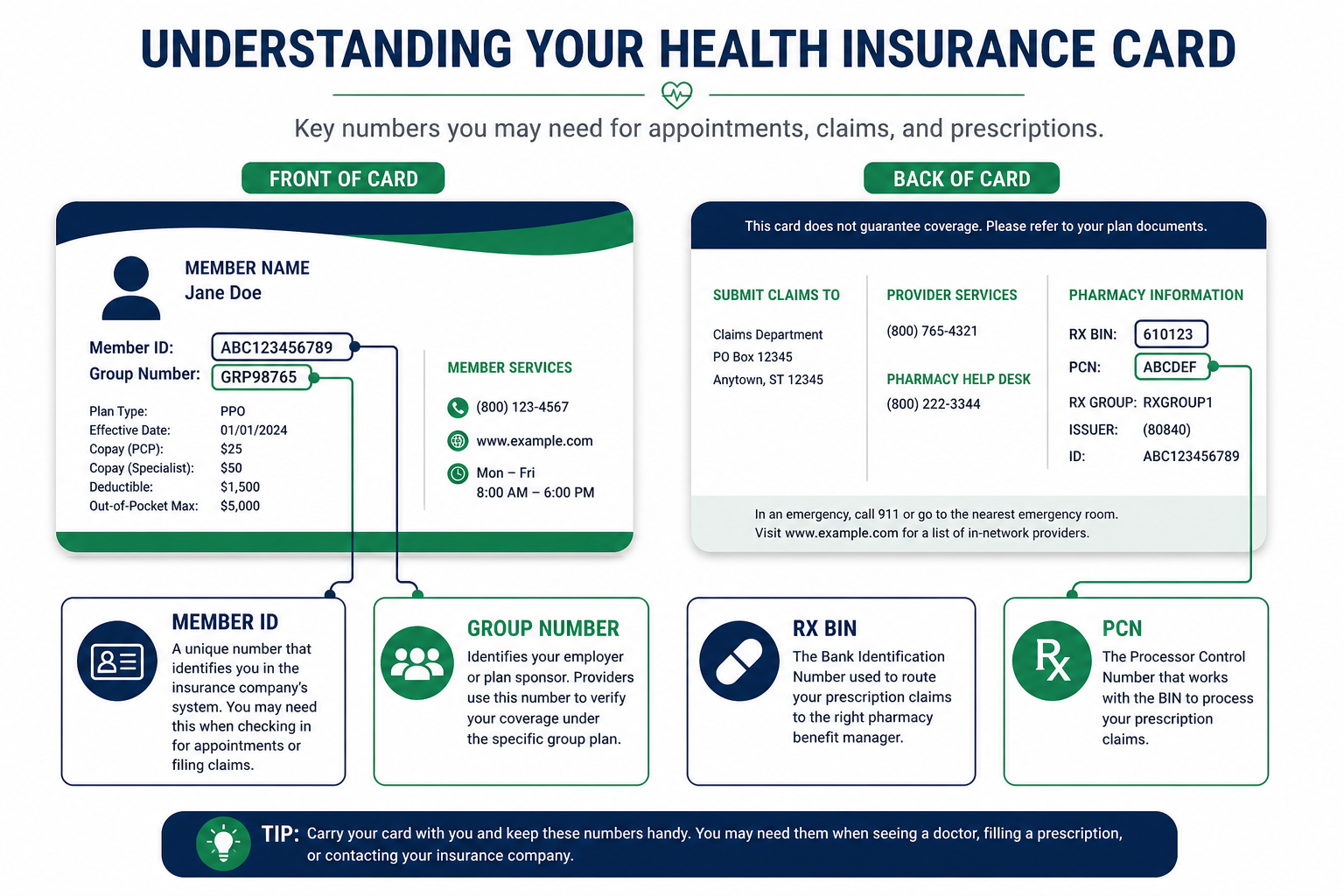
Front of the Card vs. Back: What Each Side Tells You
Key Takeaway: The front of your card identifies you and your medical plan. The back routes pharmacy claims and lists customer service contacts. Medical offices use the front; pharmacies use the back. Mixing up the two sides is a top reason for claim rejections at the point of service.
Learning how to read a health insurance card starts with understanding that your card is really two documents in one. The front carries identifiers for medical claims, who you are, which plan covers you, and which insurer processes your doctor visits. The back carries pharmacy routing codes that tell the pharmacist's computer which PBM adjudicates your prescriptions and which formulary applies.
Most cards pack six to ten data fields into a space smaller than a credit card. Carrier branding, plan type (HMO, PPO, EPO), and network name often appear alongside the numbers. Digital cards in your insurer's mobile app show the same fields, sometimes with additional details like your deductible progress and out-of-pocket maximum status that physical cards omit.
If you are unsure what a specific number on your card represents, our guide on what is a medical insurance policy number explains how the policy number differs from your member ID and group number, three fields that patients confuse more than any others.
Member ID and Subscriber ID: Your Individual Identifier
Key Takeaway: Your member ID identifies you as an individual enrollee. Every person on a family plan has a unique member ID, even when they share the same group and policy numbers. Providers enter this number on every claim form, prior authorization request, and eligibility check.
The member ID is the first number providers ask for at check-in. It appears on your card under labels like Member ID, Subscriber ID, Enrollee ID, or simply ID. Formats vary widely: some carriers use alphanumeric strings (W123456789), others use nine-digit numbers, and Medicare uses the 11-character Medicare Beneficiary Identifier (MBI).
On family plans, the subscriber (usually the employee or primary account holder) has one member ID, and each dependent has a separate member ID. The subscriber's ID may appear with a suffix like “01” while dependents show “02,” “03,” and so on. Pediatric patients sometimes use a parent's member ID with a dependent suffix, check your card or portal to confirm the exact format your carrier expects.
When filing an appeal, always use the member ID of the person who received the service, not the subscriber's ID unless they are the same person. Mismatched member IDs are the single most common reason appeal intake teams return packets as incomplete before a medical reviewer opens the file.
Group Number and Policy Number: Your Plan Contract Identifiers
Key Takeaway: The group number identifies your employer's or organization's insurance contract. The policy number identifies the specific plan or benefit package. All family members on the same plan share these numbers. Both are required on medical claims alongside your member ID.
| Field | What It Identifies | Typical Card Label | Shared Across Family? |
|---|---|---|---|
| Group number | Employer or organization contract | Group #, GRP, Employer ID | Yes, all employees on the same plan |
| Policy number | Specific insurance plan or benefit package | Policy #, Plan #, Contract # | Yes, all members on the same plan |
| HIOS plan ID | ACA marketplace plan product | Plan ID (10- or 14-character code) | Yes, replaces group number on individual plans |
On employer-sponsored plans, the group number and policy number are sometimes the same value or closely related. On individual marketplace plans, you may see a HIOS plan ID instead of a traditional group number. Medicare Advantage cards display a contract number in the format H####-###-###. When in doubt, include every identifier printed on your card, insurers prefer too much information over too little.
RX BIN, PCN, and Pharmacy Benefit Manager (PBM) Fields
Key Takeaway: Pharmacy claims route through a PBM, not your medical insurer, using the RX BIN, PCN, and group number on the back of your card. Wrong pharmacy codes produce instant rejections at the pharmacy counter, even when your medical coverage is fully active.
Flip your card to the back. You will typically find three pharmacy-specific fields:
- RX BIN (Bank Identification Number): A six-digit code that routes your prescription claim to the correct PBM processing system. Think of it as the pharmacy equivalent of a bank routing number.
- PCN (Processor Control Number): A secondary routing code that further directs the claim within the PBM's network. Not all cards show a PCN, some PBMs process claims using BIN and group number alone.
- RX Group: May match your medical group number or may be a separate pharmacy-specific group. Pharmacies enter this alongside the BIN and PCN when submitting claims.
The PBM name often appears near these fields: Express Scripts, OptumRx, CVS Caremark, or another pharmacy benefit administrator. Your medical insurer and your PBM are frequently different companies. UnitedHealthcare medical claims go to UHC; your prescriptions may route through OptumRx. Cigna medical claims go to Cigna; pharmacy claims may route through Express Scripts.
If your pharmacy rejects a fill, ask the pharmacist to verify the BIN, PCN, and group against your card before calling your insurer. Nine times out of ten, the rejection is a data entry error, not a coverage denial.
Copays, Deductibles, and Network Information on Your Card
Key Takeaway: Copay amounts printed on your card are quick-reference estimates, not binding cost guarantees. Your actual patient responsibility depends on whether you have met your deductible, whether the provider is in-network, and whether the service requires prior authorization.
Many cards list copay tiers on the front:
- Office visit (PCP): Primary care copay, typically $20–$40 for in-network visits.
- Specialist: Higher copay for specialist visits, often $40–$75.
- Urgent care: Mid-range copay between PCP and ER levels.
- Emergency room: Highest copay tier, $150–$500 or more, plus possible coinsurance after the copay.
- Prescription tiers: Some cards list generic, preferred brand, and non-preferred brand copays. Mail-order copays may appear separately.
Cards also display your plan type and network: HMO, PPO, EPO, or POS. HMO cards may list a primary care physician name or medical group. PPO cards may note out-of-network coverage availability. These labels affect how claims process, an out-of-network specialist visit on an HMO plan may be denied entirely, while a PPO plan may cover it at a higher coinsurance rate.
For exact deductible amounts, out-of-pocket maximums, and coinsurance percentages, check your insurer portal or Summary of Benefits and Coverage (SBC). The card is a wallet-sized summary, not a complete benefits document.
Back of the Card: Customer Service and Prior Authorization Numbers
Key Takeaway: The back of your card lists phone numbers for member services, mental health, pharmacy, prior authorization, and nurse hotlines. Use the correct number for your issue, calling the general line for a pharmacy problem wastes time and may route you to the wrong department.
Standard back-of-card contacts include:
- Member services / customer service: General coverage questions, ID card replacement, and claim status inquiries.
- Provider services: For healthcare providers calling to verify eligibility, patients rarely need this number.
- Pharmacy help desk: Prescription coverage questions, formulary lookups, and pharmacy claim rejections.
- Prior authorization: Submitting or checking status on pre-approval requests for medications, procedures, or durable medical equipment.
- Mental health / behavioral health: Separate line for therapy, psychiatry, and substance abuse services, often administered by a different vendor than medical claims.
- Nurse hotline / 24-hour advice: Clinical triage for non-emergency health questions.
TTY numbers for hearing-impaired callers and URLs for member portals also appear on the back. Save the portal URL in your phone, it is faster than calling for claim status, EOB downloads, and digital ID card access.
Wrong vs. Correct Card Information on Claims and Appeals
Key Takeaway: Insurer intake teams match appeals to claim records using the exact identifiers from your card. Swapping member ID and group number fields, using an expired card, or omitting pharmacy routing codes causes administrative rejections that reset your appeal deadline clock.
| ❌ Wrong Card Info Usage | ✅ Correct Card Info Usage |
|---|---|
| Handing the front of the card to the pharmacist without providing RX BIN and PCN from the back, pharmacy system cannot route the claim. | Providing the pharmacist with member ID from the front plus RX BIN, PCN, and RX group from the back. Confirming the PBM name (Express Scripts, OptumRx, or Caremark) matches what the pharmacy has on file. |
| Entering your member ID in the policy number field on an online appeal form because both fields look similar. | Copying each identifier into its matching field: member ID in the member ID box, group or policy number in the plan/group box. Verifying against your most recent EOB header before submitting. |
| Using last year's insurance card after open enrollment because the new card has not arrived in the mail yet. | Downloading the current digital card from your insurer portal or Availity. Every identifier on the digital card reflects the active plan year. |
| “My appeal was returned as incomplete but I included my member ID.” | “Re: Internal Appeal, Member ID W123456789, Group GRP-88420, Policy #PLN-2026-441, Claim #CLM-2026-88201, DOS 03/15/2026. All identifiers match my current card and EOB.” |
The pattern is consistent: wrong submissions use incomplete or outdated card information. Correct submissions include every identifier from the current card, member ID, group, policy number, and claim number, so the insurer can locate your record in a single lookup.
Need an Appeal Letter With the Right Card Identifiers?
AppealFlow's free generator prompts for member ID, policy number, claim number, and denial details , then drafts a formal appeal letter ready for submission in under 60 seconds.
Verifying Card Info on Availity, Express Scripts, OptumRx, and Caremark
Key Takeaway: Your insurer portal is the most reliable source for current card information, especially after open enrollment or a plan change. Physical cards lag behind digital updates by two to three weeks.
| Platform | Used By | Where to Find Card Fields |
|---|---|---|
| Availity | BCBS, Aetna, Humana, many regional medical plans | Member login → My Profile → ID Card. Shows member ID, group, policy number, and plan effective dates. Downloadable PDF matches what providers see during eligibility checks. |
| Express Scripts | Cigna, some BCBS and employer pharmacy benefits | Member portal → Coverage & Claims → View ID Card. Displays RX BIN, PCN, group, and member ID for pharmacy claims. Prior auth forms auto-populate from your profile. |
| OptumRx | UnitedHealthcare and many employer pharmacy plans | Login → Plan & Benefits → Pharmacy ID Card. Shows BIN, PCN, group, and formulary tier copays. Mail-order section lists separate routing codes if applicable. |
| CVS Caremark | Aetna, CVS Health, and many employer pharmacy plans | Caremark.com → View My Card. Full pharmacy routing information plus prescription history and formulary search. Caremark app stores a digital card with push notifications for refill reminders. |
After open enrollment or a job change, log into each portal within 48 hours and compare the digital card to your physical card. If the numbers differ, use the portal version, it reflects the active plan year. Update your pharmacy and provider records with the portal numbers immediately.
What to Do When Your Card Information Is Wrong on a Claim
Key Takeaway: A mismatched identifier on your Explanation of Benefits means the claim processed under the wrong plan or plan year. Fix the identifier before appealing the medical denial, otherwise your appeal attaches to the wrong record and gets returned as incomplete.
If your EOB shows a member ID, group number, or policy number you do not recognize, take these steps:
- Compare the EOB identifiers to your current card and portal profile. If they differ, the provider billed using outdated information from their records.
- Call member services. Confirm which identifiers are active for your account and whether the claim processed under the correct plan year.
- Request claim reprocessing. If wrong card information caused the denial, ask for correction and reprocessing before filing a formal appeal.
- Update your provider's billing records. Give the front desk your current member ID, group number, and policy number at your next visit.
- File your appeal with correct identifiers. Once the claim reprocesses under the right plan, appeal any remaining medical denial with the updated claim number and card information.
Common myth: Appealing a medical denial will automatically fix an administrative error like a wrong member ID or group number. It will not. Administrative errors require a separate correction request, often resolved faster than a full medical appeal.
Five Card-Reading Mistakes That Delay Claims and Appeals
Key Takeaway: Identifier errors are preventable. Double-check every number against your insurer portal and most recent EOB before submitting any claim-related paperwork.
- Using an expired card after open enrollment. Group and policy numbers change with new plan years. Always check your portal for the current digital card.
- Confusing member ID with group or policy number. All three are required on medical claims and appeals. Submitting only your member ID causes routing failures.
- Ignoring the back of the card at the pharmacy. Medical identifiers from the front do not route pharmacy claims. Provide RX BIN, PCN, and group from the back.
- Not updating providers after a plan change. Billing systems retain old card data until you provide updated identifiers at check-in.
- Appealing before fixing an identifier mismatch. Correct administrative errors first, then appeal any remaining medical denial on the corrected claim.
In my experience reviewing appeal submissions, roughly 15–20% of first-time appeals are returned for incomplete identifiers before a medical reviewer ever opens the file. Taking five minutes to read your card carefully and match every field to your portal profile prevents weeks of back-and-forth with the insurer.
Frequently Asked Questions
Answers to the most common questions about how to read a health insurance card and use each field on claims and appeals.
Generate Your Free Appeal Letter
AppealFlow.net drafts a formal appeal letter with fields for member ID, policy number, claim number, and denial details, edit it live, then download as PDF or Word. No account required.
- 100% Free
- No Signup
- PDF & Word Export
Disclaimer: This article is for educational purposes only and does not constitute medical or legal advice. AppealFlow.net is not a healthcare provider or law firm. Card formats and field labels vary by insurer and plan type. Always verify your identifiers with member services before submitting claims or appeals. For medical emergencies, call 911. See our full disclaimer.