How to File for an Appeal
What Does It Mean to File for an Appeal?
Key Takeaway: Filing for an appeal means formally registering your dispute with the plan through the channel on your notice and keeping proof of receipt. It is not the same as calling member services or resubmitting a prior authorization form without invoking your appeal rights.
Patients who search how to file for an appeal are usually asking where to submit documentation, what to attach, and how to prove they filed on time. That submission step triggers the review clock and preserves external review options on many ACA and state-regulated plans when internal review fails.
For a broader overview of appeal rights and letter structure, see how to file a health insurance appeal. This guide focuses on portals, PBM channels, confirmation steps, and the documentation packet reviewers expect when you file for your appeal.
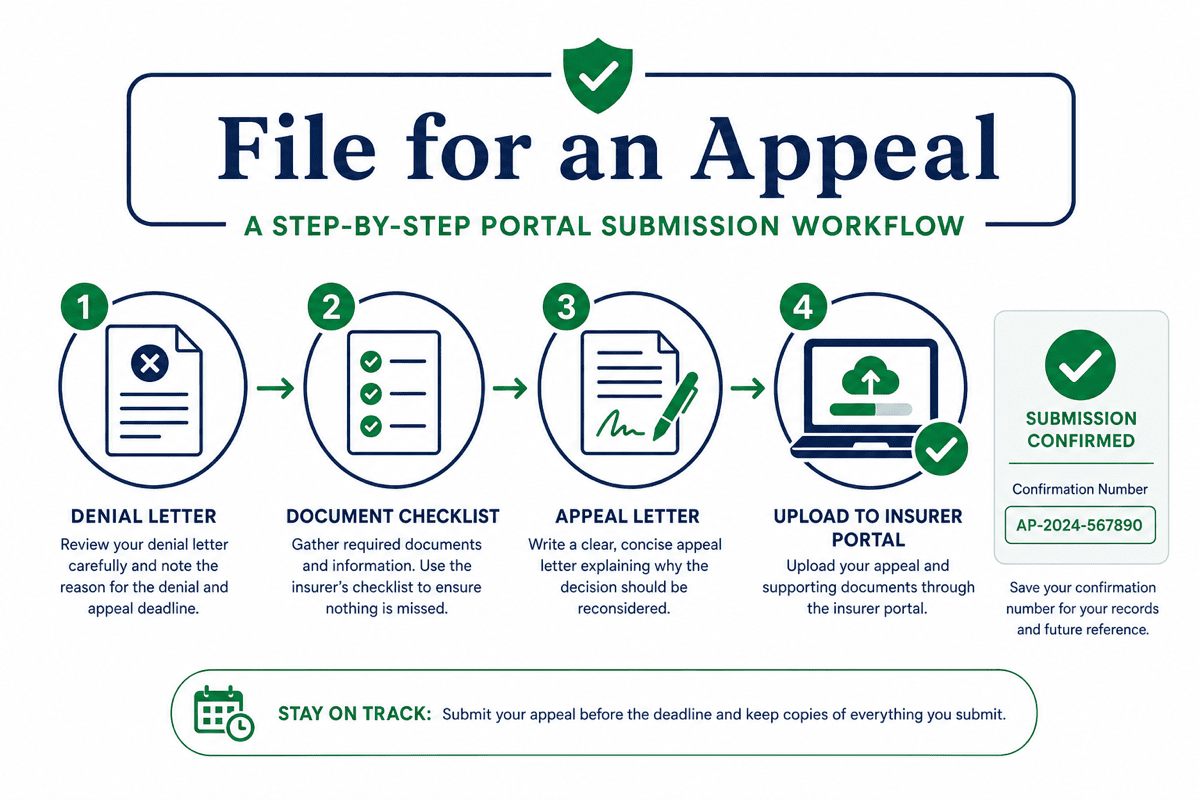
How Do You File for an Appeal Step by Step?
Key Takeaway: Work in order: written denial, reason code, records, letter, submission proof. Skipping the reason code or missing the deadline are the two mistakes that cannot be fixed later.
- Get the denial in writing. Call your plan if needed, but keep the formal denial letter or EOB with the reason code, claim number, and appeal instructions. Your packet starts with this document.
- Read your EOB line by line. Match each denied service to its remark or reason code. If codes are unclear, see how to read an Explanation of Benefits before you draft the appeal.
- Request your claim file when allowed. ERISA-covered employer plans must provide claim documents used in the denial under federal claims procedures summarized by the U.S. Department of Labor. Submit the request in writing to the plan administrator listed on your notice.
- Gather records that answer the denial reason. Clinical denials need visit notes, labs, or imaging. Step therapy denials need dated trials with outcomes. Prior authorization denials need authorization confirmations or urgency documentation.
- Write your appeal letter. Include member ID, claim number, denial date, and reason code in the subject line. For letter structure, see how to write a health insurance appeal letter.
- Submit through the channel on your notice. Medical appeals usually go through your health plan portal. Pharmacy appeals often route through your pharmacy benefit manager. Save confirmation numbers or mail receipts.
- Track the written decision. Note the review period your plan must follow. If internal review fails, read your notice for external review instructions. Internal appeal vs external review explains how the two levels differ.
Weak vs. Strong Language When Filing an Appeal
Key Takeaway: Reviewers route appeals by claim number and denial code. Specific identifiers and dated clinical facts move faster than emotional pleas without documentation.
| Weak wording | Strong wording |
|---|---|
| “My doctor ordered this MRI. Insurance should pay for it.” | “Internal appeal for claim CLM-88421, denial code CO-50, dated 7/20/2026. Member ID ABC123456. Attached: physician letter, six weeks of conservative treatment notes, and ACR appropriateness criteria for lumbar MRI with progressive radiculopathy.” |
| “Please approve my medication. I really need it.” | “Pharmacy appeal for PA-STEP denial on claim RX-44219. Attached: 90-day metformin trial with documented intolerance, BMI and ICD-10 codes, and prescriber attestation dated 8/1/2026.” |
| “This denial is unfair. Please fix it immediately.” | “Requesting review under the internal appeals process described on my denial notice. Enclosures listed as Exhibit A through D. Submitted via member portal, confirmation number 88421 on 9/2/2026.” |
Need a Formatted Appeal Letter?
AppealFlow's free health insurance appeal letter generator applies the header block, denial code references, and enclosure list so you can focus on attaching the right clinical records. Browse the appeal tools hub for specialized denial letter generators.
Where Do I Submit a Health Insurance Appeal?
Key Takeaway: Use the portal, fax, or mail address printed on your denial letter. Medical and pharmacy appeals use different channels on many plans. Sending to the wrong desk can delay review by weeks.
| Denial type | Typical submission channel | What to verify |
|---|---|---|
| Medical claim | Health plan member portal or appeals fax on your notice | Claim number and medical appeals unit address match your denial letter |
| Prescription / PBM | Pharmacy benefit manager portal or prescriber electronic system | PBM name on your insurance card matches the portal you use |
| Medicare Advantage / Part D | Plan appeals unit or Medicare.gov redetermination process | Medicare notice lists the correct level and deadline |
| Certified mail backup | Appeals address on denial letter with return receipt | Postmark date saved if portal submission is unavailable |
Portal uploads usually generate instant confirmation numbers. Fax submissions need a cover sheet with member ID, claim number, and a document list. Mail should use certified mail with return receipt when your notice allows paper filing.
What Documents Do I Need to File a Health Insurance Appeal?
Key Takeaway: Attach only records that answer the denial reason on your notice. Label each file as Exhibit A, B, or C and repeat those labels in your letter and enclosure list.
- Copy of the denial letter and EOB for the same claim
- Physician letter of medical necessity tied to the denial code and diagnosis
- Visit notes, lab results, imaging reports, or operative records referenced in your letter
- Prior authorization confirmations or step therapy logs when those reasons appear on your notice
- Your signed appeal letter with member ID and claim number on every page
What Are My Appeal Rights and Deadlines?
Key Takeaway: The deadline on your denial notice controls. Federal rules set minimum windows for many plan types, but your notice may allow longer. Calendar the date the day you receive the denial.
| Plan type | Typical internal appeal window | Primary source |
|---|---|---|
| ACA marketplace plan | Often at least 180 days per notice | Healthcare.gov |
| ERISA employer group plan | At least 180 days under federal rules | DOL ERISA materials |
| Medicare Advantage / Part D | Separate clocks on Medicare notices | Medicare.gov |
| Medicaid | State fair-hearing deadlines vary | State Medicaid agency on your notice |
For a full deadline breakdown by plan type, see how long you have to appeal a health insurance denial. File early enough to correct a routing error before the clock runs out.
What Happens After I File an Appeal?
Key Takeaway: After submission, a different reviewer evaluates your records against plan policy. You should receive a written decision within the standard or expedited timeframe that applies to your case. Keep every confirmation and follow-up note in one folder.
If your appeal is approved, confirm the corrected claim or authorization appears in your insurer or PBM portal before you schedule care or fill a prescription. A verbal approval without an updated authorization can still fail at the pharmacy or billing desk.
If internal review upholds the denial, your notice should explain external review or state complaint options for your plan type. Healthcare.gov external review guidance describes the process for many marketplace plans.
What Mistakes Slow Down Health Insurance Appeals?
Key Takeaway: Most preventable delays come from missed deadlines, wrong submission channels, or packets that never address the listed denial reason. Fix those three items before you file.
- Missing the deadline. Calendar the date on your notice the day you receive the denial. File early even if one record is still arriving.
- No physician support for clinical denials. Medical necessity appeals need a treating clinician's written rationale, not only a patient-written letter.
- Ignoring the reason code. A CO-50 medical necessity denial needs different evidence than a prior authorization or step therapy denial.
- Wrong submission channel. Pharmacy appeals sent to a medical plan portal can sit unread for weeks.
- No proof of filing. Without confirmation numbers or mail receipts, you cannot show you met the deadline if the plan claims it never received your packet.
Frequently Asked Questions
Common questions about how to file a health insurance appeal, deadlines, documents, and submission channels.
File Your Health Insurance Appeal Letter
AppealFlow drafts a formatted health insurance appeal letter with member identifiers, denial code references, and enclosure lists. Edit live, then download as PDF or Word. No account required.
- 100% Free
- No Signup
- PDF & Word Export
Disclaimer: This article is for educational purposes only and does not constitute medical or legal advice. AppealFlow.net is not a healthcare provider, insurance broker, or law firm. Appeal deadlines, review timeframes, and submission channels vary by plan type and state. Verify current requirements on your denial notice, plan documents, Healthcare.gov, or CMS.gov before acting. For medical emergencies, call 911. See our full disclaimer.